


Introduction
Solscan of Contents
Solscan is one of the most useful tools in the Solana ecosystem. It helps users read blockchain data in a simple way. Instead of staring at long wallet addresses and confusing transaction strings, people can use Solscan to view clear records of what happened on-chain. That makes it easier to check transfers, inspect wallets, follow token activity, and study NFT movement.
For many users, Solana moves too fast to track without help. Payments happen in seconds. Tokens change hands all day. NFT assets move between wallets often. At the same time, wallet apps and marketplaces may show only limited details. In those moments, Solscan becomes important because it gives users direct access to public blockchain records in a format they can understand.
Beginners like Solscan because it reduces confusion. Traders use it because it helps them verify activity. Developers rely on it because it shows transaction details in a clearer way. Collectors also benefit from it when they want to review NFT history. Across all of these cases, Solscan turns raw blockchain data into useful information.
What Is Solscan?
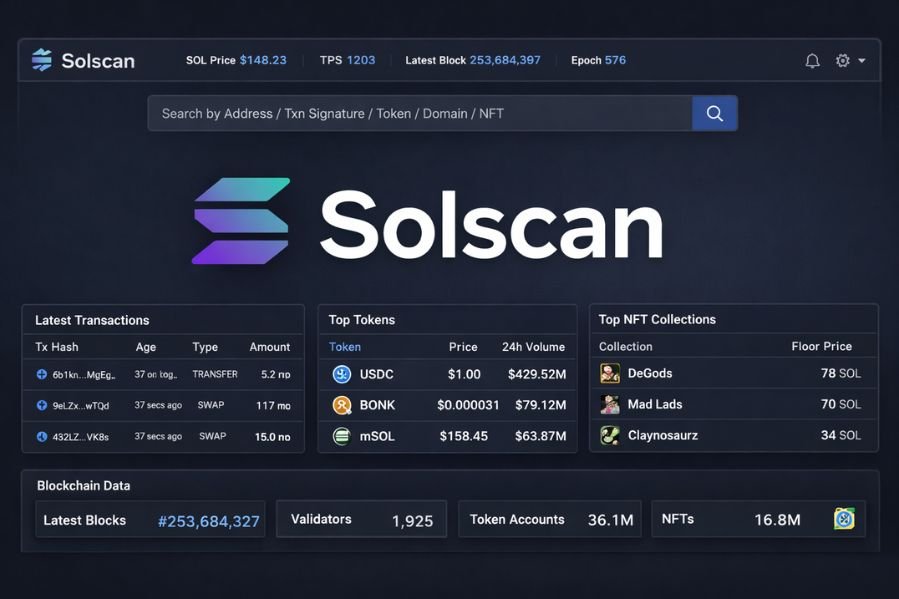
Solscan is a blockchain explorer built for the Solana network. A blockchain explorer is a tool that lets people search public on-chain data. Users can enter a wallet address, transaction signature, token name, NFT, or block number. The platform then shows the related records.
In simple terms, Solscan works like a search engine for Solana activity. It helps users see what happened on the blockchain without reading raw data. That matters because blockchain records are public, but they are not always easy to follow. Solscan solves that problem by arranging the information in a cleaner and more readable format.
A good explorer does more than show numbers. It helps users understand movement, timing, and account activity. That is exactly why Solscan has become popular. It gives people a better way to view balances, transfers, wallet histories, and other on-chain details.
Why Solscan Matters
The Solana network handles a huge amount of activity every day. Users send SOL, buy tokens, trade assets, stake funds, mint NFTs, and use decentralized apps. When something goes wrong, they need a fast way to check the blockchain. Solscan gives them that option.
Trust is another reason Solscan matters. In crypto, many claims spread quickly. A project may promise strong growth. A token may look popular online. A wallet may seem important in a community discussion. Public blockchain records help users check those claims, and Solscan makes that process easier.
This kind of visibility supports better decisions. Rather than depending only on screenshots, wallet app messages, or social media posts, users can inspect the blockchain directly. That does not remove every risk, but it gives them stronger evidence.
How Solscan Works
Using Solscan is simple. A user copies a wallet address, transaction signature, token identifier, or NFT detail into the search bar. The platform then opens a page with the related data. That page may include balances, transfers, account history, timestamps, and linked wallets or assets.
Behind the scenes, Solscan collects public Solana blockchain data and organizes it in a readable format. This is important because many blockchain actions are more complex than they look. A single swap can include several instructions. An NFT purchase may involve multiple account updates. A staking action may connect to validator-related records. Solscan helps users see those steps more clearly.
That clear layout saves time. It also reduces confusion. People do not need advanced technical knowledge just to understand a transfer or wallet interaction.
Tracking Transactions on Solscan
One of the most common reasons people use Solscan is to check a transaction. Every Solana transaction has a unique signature. When that signature is entered into Solscan, the platform shows the details of the event.
A transaction page can tell users whether the action succeeded or failed. It can also show the time, fee, sender, receiver, and asset movement involved. This is very helpful when a wallet app gives only a small update or delays a full status message.
Many transactions on Solana involve more than a simple payment. Swaps, staking actions, and app interactions may include several steps inside one record. Solscan helps break that process down. As a result, users get a better view of what really happened on-chain.
Exploring Wallets with Solscan
Wallet pages are one of the most useful parts of Solscan. When a user searches for a wallet address, the platform can show the wallet’s SOL balance, token holdings, NFT assets, and transaction history. This gives a wider picture of how that wallet behaves.
That information can be useful in many situations. A trader may want to inspect a large holder. A community member may want to review a project treasury. A buyer may want to study the wallet linked to an NFT collection. In each case, Solscan makes public wallet activity easier to read.
Patterns in wallet history can also reveal useful clues. Some wallets hold assets for long periods. Others trade often. A few receive large transfers from many accounts. These patterns do not explain everything, but they can help users understand behavior more clearly.
Using Solscan for Token Research
Solscan is also a helpful tool for token analysis. Token pages often show transfer activity, wallet distribution, and holder information. This gives users a better sense of how a token is moving across the network.
Distribution matters because concentration can affect risk. If only a few wallets hold most of a token’s supply, users may see that as a warning sign. A wider spread across many wallets may look healthier to some researchers. Solscan does not make investment choices for users, but it does provide the data needed for closer review.
On-chain activity also matters. A token may receive a lot of attention online while showing weak movement on the blockchain. In other cases, strong on-chain activity may support a growing project. Solscan helps users compare public claims with real blockchain records.
How Solscan Helps NFT Users
NFT collectors and researchers also use Solscan. The platform can show ownership history, asset movement, and wallet links tied to NFTs on Solana. That makes it easier to review how an NFT has moved over time.
A buyer may want to know whether an item changed hands several times in a short period. Another user may want to verify who currently holds an asset. Someone researching a collection may want to inspect wallets connected to the project. Solscan helps with all of these tasks.
Marketplace pages do not always show the full record. Public blockchain data gives users another layer of visibility. With Solscan, NFT research becomes more detailed and more grounded in actual on-chain information.
Why Developers Use Solscan
Developers often need to inspect blockchain activity in detail. Solscan helps by showing transaction steps, account changes, and program interactions in a clearer way. This can be useful during testing, debugging, and app monitoring.
Advanced users also benefit from the platform. Some track large wallet moves. Others review token flows or study contract-related activity. In those cases, Solscan becomes part of a deeper research process.
The main value stays the same for all users. Complex blockchain records become easier to read. That alone makes analysis faster and more practical.
Main Benefits of Solscan
Clarity is one of the biggest benefits of Solscan. Public blockchain data can be hard to understand, especially for new users. A clean explorer helps reduce that problem.
Transparency is another major benefit. Users can verify transfers, wallet activity, and token movement on their own. That supports better research and cuts down on confusion.
Convenience also matters. Solscan brings several types of Solana data into one place. Users can start with a transaction and then move into wallet research, token checks, or NFT history without switching tools.
Limits of Solscan
Even though Solscan is very useful, it has limits. It shows public records, but it does not always explain the reason behind them. A wallet may move large amounts of tokens, yet the platform may not reveal who controls it or why the transfer happened.
Users should also remember that Solscan is not a safety guarantee. A token may look active on-chain and still be risky. A wallet may appear important and still be misunderstood. NFT history may be visible, but future value is never certain.
For that reason, Solscan works best as a research and verification tool. It provides evidence. It does not replace judgment, context, or careful decision-making.
Best Ways to Use Solscan
A smart way to use Solscan is to begin with one clear goal. If the goal is to confirm a payment, search the transaction signature. If the goal is wallet research, review balances and transaction history over time. If the goal is token analysis, look at holder spread and transfer activity.
Users should also avoid rushing to conclusions. One transaction may not tell the full story. A wallet can have several roles. Unusual token movement may have different explanations. Careful review usually leads to better insight.
That is why patience matters when using Solscan. The platform gives useful data, but users still need to think critically about what they see.
Conclusion
Solscan is one of the best tools for understanding the Solana blockchain. It helps users check transactions, inspect wallet activity, study token movement, and review NFT history in one place. By turning raw records into readable information, Solscan makes Solana easier to understand.
Its value is simple but powerful. Users no longer need to rely only on guesswork or limited app messages. They can check the blockchain directly and review the facts for themselves. That makes Solscan useful for beginners, traders, collectors, researchers, and developers.
As Solana continues to grow, clear blockchain tools will remain important. Solscan stands out because it gives users a practical way to read public data and make better sense of on-chain activity.
Disclaimer
This article is for informational purposes only. It does not provide financial, legal, investment, or technical advice. Solscan is a tool for reading public blockchain data, but users should always do their own research before making decisions about Solana, cryptocurrencies, tokens, NFTs, or blockchain projects.
For More Information cryptobignews.com
